Build with complete SQL lineage
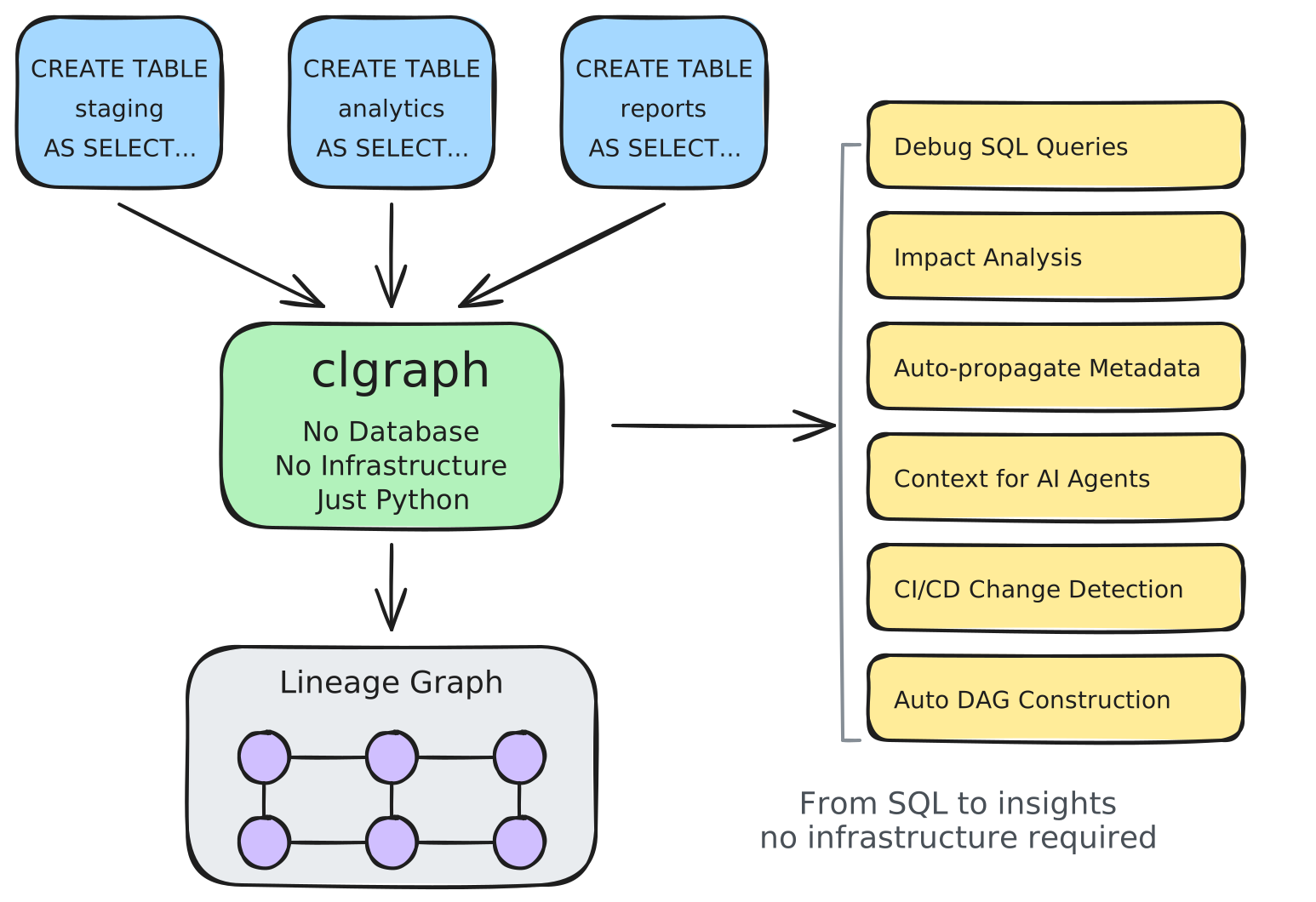
clgraph (Column-Lineage Graph) parses your SQL queries and automatically builds the column lineage graph, capturing all relationships across your pipeline to support SQL-related workflows—from impact analysis to AI context engineering.
Your SQL Already Contains Everything
You write SQL files. Tables, columns, transformations, metadata, joins - it's all there in your code.
We parse it once. You get the complete graph.
from clgraph import Pipeline

# Point to your SQL files
pipeline = Pipeline.from_sql_files("examples/sql_files/", dialect="bigquery")

# That's it. Complete graph built automatically.
The column lineage graph captures how data flows through your SQL: every column is a node, every transformation is an edge. Once you have this graph, a lot of SQL-related tasks become simple traversals:
- Impact analysis? Forward trace through the graph.
- Root cause debugging? Backward trace through the graph.
- PII compliance? Mark nodes, propagate through edges.
- DAG construction? Project to table-level dependencies.
- Documentation? Describe nodes and their relationships.
- AI applications? Context engineering is graph traversal.
One graph. Many applications.
Column lineage built-in. No upgrades. No extra cost.
→ Why we built this: Our philosophy and approach
Your Lineage, Your Control
Other tools lock your lineage in their platform. We give it to you.
from clgraph import Pipeline

# Your lineage lives in your code
pipeline = Pipeline.from_sql_files("examples/sql_files/", dialect="bigquery")

# It's yours - use it however you want
lineage_json = pipeline.to_json()      # Export to JSON
metadata = pipeline.columns             # Query directly
tables = pipeline.table_graph.tables    # Table dependencies

print(f"Exported {len(lineage_json['columns'])} columns")
print(f"Found {len(metadata)} total columns")
print(f"Pipeline has {len(tables)} tables")
No SaaS lock-in. No forced subscriptions. No vendor dependency.
Access every table, every column programmatically. They're organized as a graph object.
- ✅ Airflow - Built-in DAG generation
- ✅ Your orchestrator - Bring your own (dbt, Dagster, Prefect)
- ✅ Your data catalog - Export and integrate
- ✅ Your custom tooling - Full API access
Own your lineage. Integrate anywhere.
Beyond Traditional Lineage
The complete graph unlocks more:
Automatic Metadata Propagation
Document where you define. Extract automatically.
from clgraph import Pipeline

# Add metadata in your SQL comments
sql = """
CREATE TABLE output AS
SELECT
  user_id,  -- User ID [pii: false]
  email,    -- Email [pii: true, owner: data-team]
  SUM(revenue) as total  /* Total revenue [tags: metric] */
FROM users
GROUP BY user_id, email
"""

pipeline = Pipeline.from_tuples([("query", sql)], dialect="bigquery")

# Metadata extracted automatically
email = pipeline.columns["output.email"]
print(email.description)  # "Email"
print(email.pii)          # True
print(email.owner)        # "data-team"

# Propagate metadata through lineage
pipeline.propagate_all_metadata()

# Query anywhere
pii_columns = pipeline.get_pii_columns()
metrics = pipeline.get_columns_by_tag("metric")
print(f"Found {len(list(pii_columns))} PII columns")
print(f"Found {len(list(metrics))} metric columns")
Governance that scales with your pipeline, not against it.
Precise Impact Analysis
Know exactly what breaks. Not "probably everything".
from clgraph import Pipeline

queries = [
    ("raw", "CREATE TABLE raw.orders AS SELECT order_id, amount FROM source.orders"),
    ("staging", "CREATE TABLE staging.orders AS SELECT SUM(amount) as total_amount FROM raw.orders"),
]
pipeline = Pipeline.from_tuples(queries, dialect="bigquery")

# Trace forward from ANY column
affected = pipeline.trace_column_forward("raw.orders", "amount")
print(f"Changing amount affects {len(affected)} downstream columns")
# Returns exact downstream impact with transformations
Change with confidence.
Context-Aware LLM Documentation
The graph provides context. LLMs provide clarity.
from langchain_openai import ChatOpenAI

pipeline.llm = ChatOpenAI(model="gpt-4")
pipeline.generate_all_descriptions()

# LLM sees:
# - Source columns and types
# - Transformations (SUM, JOIN, CASE)
# - Filter conditions (WHERE clauses)
# - Aggregation logic (GROUP BY)
Documentation that understands your data flow.
Natural Language Interface
Ask questions about your data in plain English.
from clgraph.agent import LineageAgent

agent = LineageAgent(pipeline, llm=my_llm)

# Ask any lineage question
result = agent.query("Where does revenue come from?")
print(result.answer)  # "Column revenue is derived from: raw.orders.amount"

result = agent.query("What columns contain PII?")
print(result.answer)  # "Found 5 PII columns: ..."

result = agent.query("Write SQL to get top customers by revenue")
print(result.data["sql"])  # Generated SQL query
LineageAgent routes questions to the right tools automatically.
Lineage Tools for AI Agents
Building blocks for automation and AI integration.
from clgraph.tools import TraceBackwardTool, ListTablesTool, GenerateSQLTool

# Use tools directly
backward = TraceBackwardTool(pipeline)
result = backward.run(table="analytics.revenue", column="total")
print(result.message)  # "Column is derived from: raw.orders.amount"

# Or create a tool registry for AI agents
from clgraph.tools import create_tool_registry
registry = create_tool_registry(pipeline, llm=my_llm)

# 16 tools available: lineage, schema, governance, SQL generation
print(registry.list_tools())
Power your AI agents with accurate lineage context.
Pipeline Execution
Graph → DAG. Deploy anywhere.
# Synchronous execution
results = pipeline.run(executor=my_executor, max_workers=4)

# Async execution
results = await pipeline.async_run(executor=my_async_executor)

# Airflow DAG
dag = pipeline.to_airflow_dag(
    executor=my_executor,
    dag_id="my_pipeline",
    schedule="@daily"
)
Write once. Execute everywhere.
Get Started
Built by data engineers, for data engineers.